Telegram:a Quick Guide to Solving the restriction on private Chats between two-way Friends Only
Telegram "Mutual Contacts Only" Chat Restriction Quick Resolution Guide
When your Telegram account encounters the "mutual contacts only" restriction (as shown in the example image, where you cannot initiate private chats with non-contacts, nor can strangers message you), it is typically because you have initiated private chats with too many new users in a short period, leading the system to suspect potential spamming behavior. This restriction is generally temporary, and the system will usually lift it automatically after 24 hours. However, you can also attempt to remove the restriction immediately by following the official appeal process below.

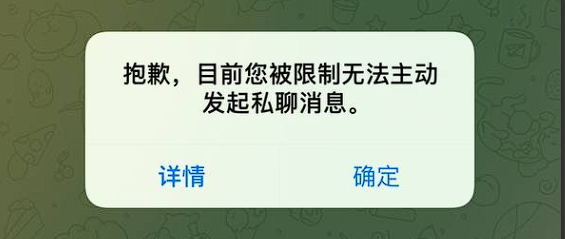
Solution: Appeal via the Official Bot
1.Find the Official BotIn
Telegram's search bar, precisely search for @Spambot.
2.Start the Conversation
Open the chat with @Spambot and click the Start button to initiate the conversation.
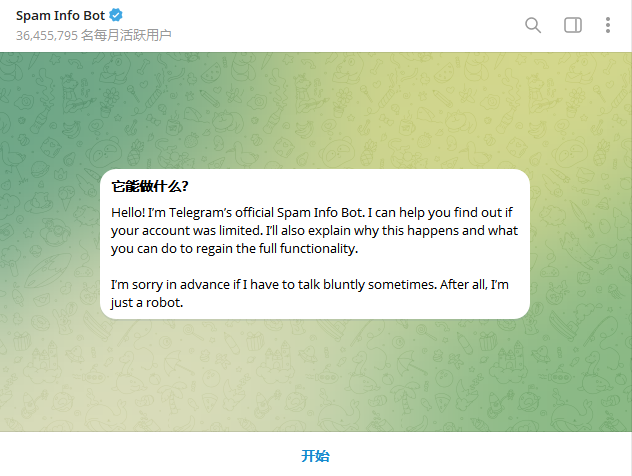
3.Navigate the Dialog & Submit Appeal
- The bot will present several options. First, select This is a mistake.
- @Spambot: Have you contacted strangers recently?
- Select Yes.
- @Spambot: Are you going to use Telegram for spam?
- Select No, I'll never do any of this!.
4.Enter Appeal Reason
At this point, the bot will prompt you for more details. Copy and paste the following English reason to the bot:
I have no idea. I have always been very abiding by the rules of Telegram. It's just that there are too many malicious people in my peers who maliciously complained about me.
5.Wait for Result
After successful submission, the bot will reply:
Thank you! Your complaint has been successfully submitted. Our team's supervisors will check it as soon as possible. If this was a mistake, all limitations will be lifted from your account soon.
After receiving this reply, please wait patiently for about 10 minutes, then try initiating a private chat again. The restriction should usually be lifted by then.
If the restriction is not lifted 1 hour after following the above steps, it is recommended that you contact official support directly via the Telegram app: Settings > Ask a Question.
Provide your account information and a description of the issue for manual review by the support team.
Important Notes
- Timing: This appeal method works best if performed as soon as possible after the restriction is triggered.
- Wait Patiently: After clicking all buttons and sending the appeal reason, wait patiently for 10 minutes. Avoid repeating the process or initiating chats with other users during this time to prevent interfering with the system's processing.
Account Usage Recommendations:
- After logging in, do not immediately join groups/follow channels at high frequency. On first login, avoid private messaging many users (Telegram's unofficial limit is ~40).
- After logging in from a new device or IP, engage in a small amount of casual chat first, then gradually increase private messaging frequency.
- 24 hours after login, immediately enable Two-Step Verification and log out from all other active sessions.
- For multiple accounts, it is recommended to use a dedicated/static IP address.
- Spread out group joining over several days to avoid triggering risk controls with a large volume of actions in a short time.
More tutorials are available at https://2-fa.cc/help
Was this article helpful?