Facebook: How to Prevent Advertising Account Fraud
Facebook: How to Prevent Advertising Account Fraud
Instances of Facebook advertising account fraud occur from time to time, causing significant losses for many advertisers and small-to-medium-sized businesses. These fraudulent charges often happen late at night or in the early morning. By the time advertisers notice anything unusual, their account balance may already be depleted. Therefore, it is crucial to learn how to identify and prevent such fraud.
I. Signs of Fraudulent Activity
Before a major loss occurs, accounts often show early warning signs. Be alert immediately if you notice any of the following:
- Unfamiliar Ad Campaigns: You might find ad campaigns in your account that you never created, often promoting content unrelated to your business. In more covert cases, fraudsters may create new ads within your old, previously paused campaigns.
- Abnormal Performance Indicators: If you see a sharp increase in ad spend while metrics such as impressions and clicks remain stagnant, or if core settings like audience targeting, placements, or bidding strategies are mysteriously modified, unauthorized activity may be occurring.
- Unknown Users with Account Access: If unfamiliar email addresses, users, or devices appear in your Business Manager user list or in your personal account’s “Security and Login” activity, your account security has likely been compromised.
II. Emergency Measures After Fraud Occurs
If you confirm your account has incurred fraudulent charges, remain calm and follow these steps to minimize losses:
Step 1: Stop Further Losses
- Go to Ads Manager and pause the active campaigns to prevent additional spending.
- Contact your bank to freeze or report the credit card linked to your Facebook account, cutting off the funding source immediately.
Step 2: Remove Unauthorized Access
After stopping the loss, you must fully remove the attacker:
- Change Passwords & Log Out Everywhere: Change your Facebook password and choose “Log out of all devices.” Also, change the password for your associated email account and update its recovery information.
- Review Login Activity: Navigate to Settings → “Security and Login.” Review “Where You’re Logged In” and log out of any unfamiliar sessions. Clear saved login sessions if necessary.
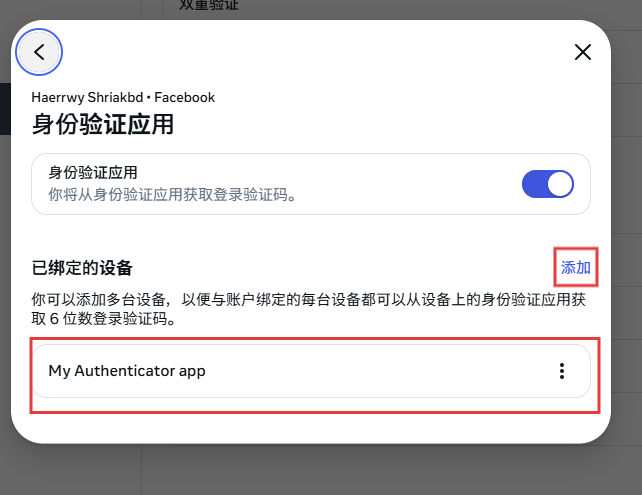
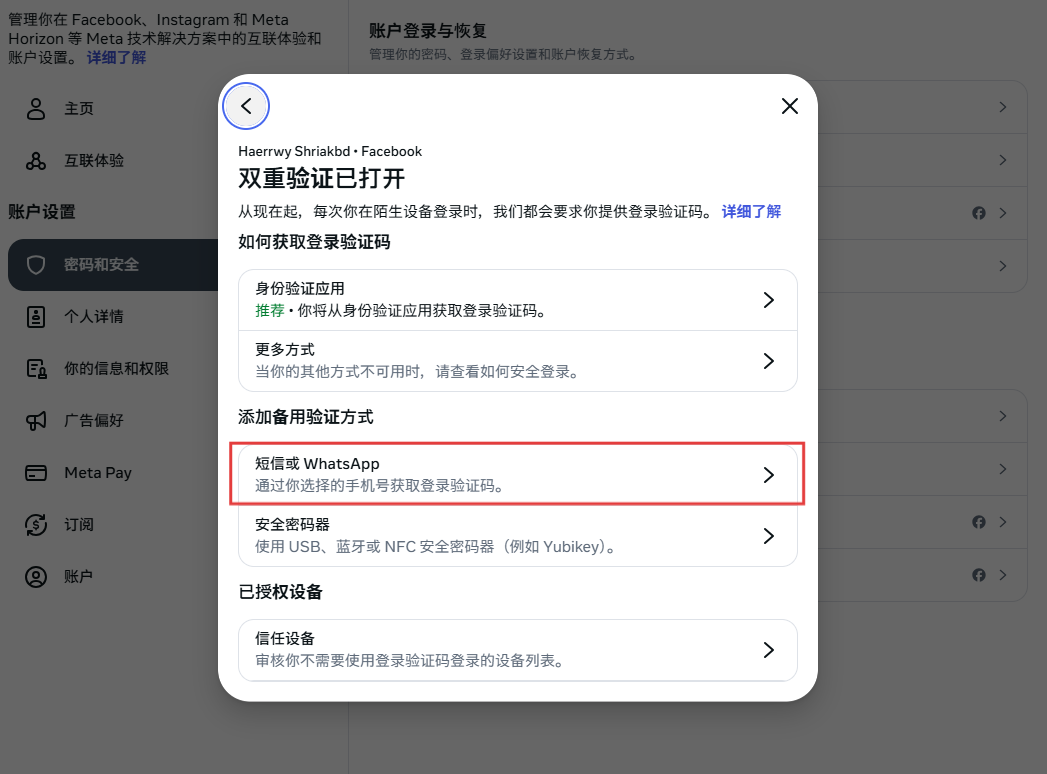
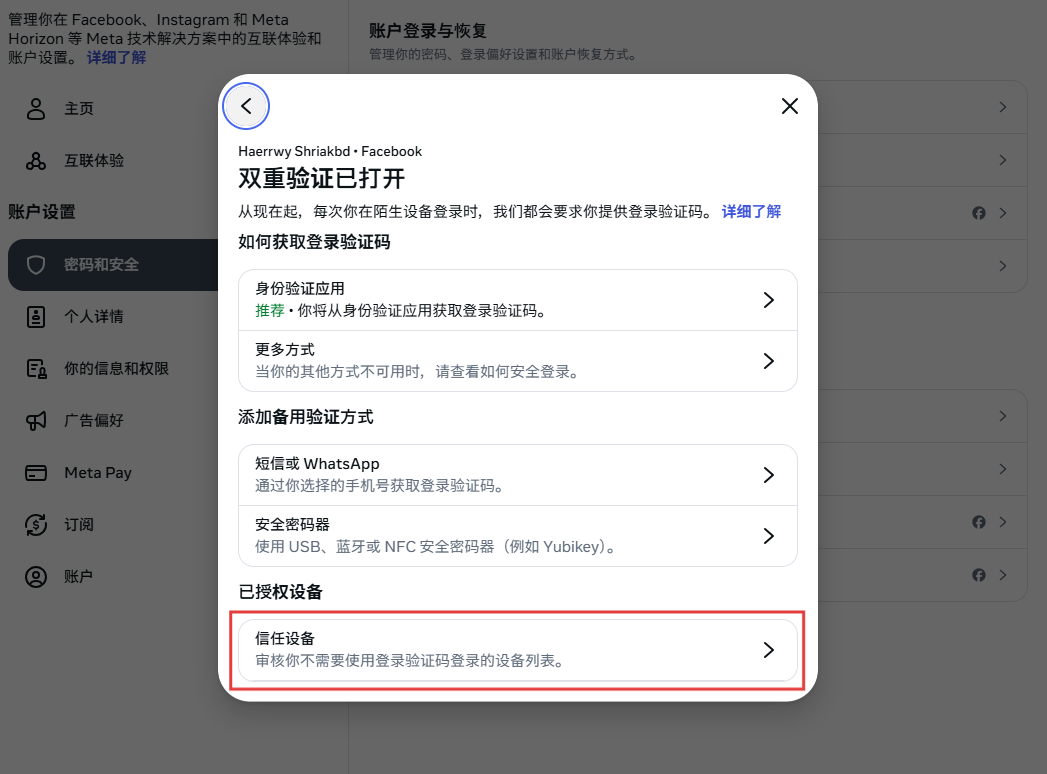
- Reset Two-Factor Authentication (2FA): Go to 2FA settings and remove any verification methods you did not set up.
Step 3: Collect Evidence and Seek Support
- Contact Meta Support: Reach out to Meta Business Support. Prepare: BM ID, Ad Account ID, IDs of affected campaigns, the disputed amount and discovery time, and evidence such as login records or ad modification logs.
- Contact Your Bank: Report fraudulent transactions and file a charge dispute. This is a critical channel for recovering funds.
Note: The appeal and recovery process may be lengthy and outcomes vary. Prevention is more effective than remediation.
III. Proactive Prevention Measures
Rather than responding passively after losses occur, focus on prevention. Take 10 minutes now to conduct a comprehensive account security check:
1. Financial Controls
Maintain a low account balance when not running ads.
Use a dedicated credit card with a low credit limit for advertising to limit potential exposure.
2. Account Security Framework
Always enable 2FA. Avoid SMS verification when possible; use an authenticator app like Google Authenticator both on Facebook and your email.
If you purchase an account, choose a reliable source.
For newly purchased or older accounts, conduct the following 5-Step Security Check:
- Review all associated email accounts and remove unknown recovery emails.
- Revoke access for unfamiliar third-party app authorizations.
- Remove unknown logged-in devices.
- Check 2FA:
- keep only your own authenticator setup, store backup keys securely, delete others.
- Remove all other verification methods and any “trusted devices.”
- Review “Account Ownership and Control” settings and remove unfamiliar trusted contacts.
3. Security-Aware Management Practices
Regularly audit Business Manager permissions (at least once a month). Remove unnecessary users and enforce the Principle of Least Privilege.
Be cautious with links in messages claiming to be “official.” Always manually enter login URLs instead of clicking links.
Was this article helpful?